I pay for @Muse Code but didn't want to live in a terminal. On Windows it's WSL-only.
So I built Helicon: an open-source desktop app for the actual Muse CLI.
• uses your existing muse login, no API key
• talks to muse serve over MSP, so Muse stays the agent
• resumes
I think a lot of people are boxing Muse in as “Hermes for normies.”
My guess is Meta intentionally keeps the deeper capabilities out of sight because the target audience does not want a complicated Hermes/Grok Bot-style setup. They aren't trying to capture the nerdy Hermes using market, they want this to be an AI agent for normies but they don't limit it as such. What it advertises its for is far from what it actually can do with very little work.
But Muse gets much more interesting once you stop thinking of its VM as the whole system.
I joined the Muse VM to my Tailscale network, gave it SSH access to a restricted user on my home Ubuntu box, and now it can run commands and browser automation through hardware I already own. I figured out Muse can do this because I asked it if it had a Tailscale skill and it said it did, then after a series of "proceed" replies, it set it up for me outside of the parts where I had to join it.
At that point, Muse stops being a “shopping assistant” and starts looking more like a control plane for your own infrastructure.
With Tailscale + SSH/API access, it can potentially:
• Manage Docker, VMs, NAS, Proxmox, and homelab services
• Pull repos,
I’m working on a hardware prototype for something that required me to source a LOT of components from different suppliers. I decided to take @Meta ‘s Muse agent for a spin and automate the procurement process. It seamlessly researched and procured line items across 14 different
A config and write-up that makes muse-spark-1.2-contributor via OpenCode Go work in DeepSeek Harness, fixing empty first-turn output and multi-turn thinking replay errors.
We tried using Meta's new Muse Code agent, but it has a bug that doesn't let it sign in from a docker container.
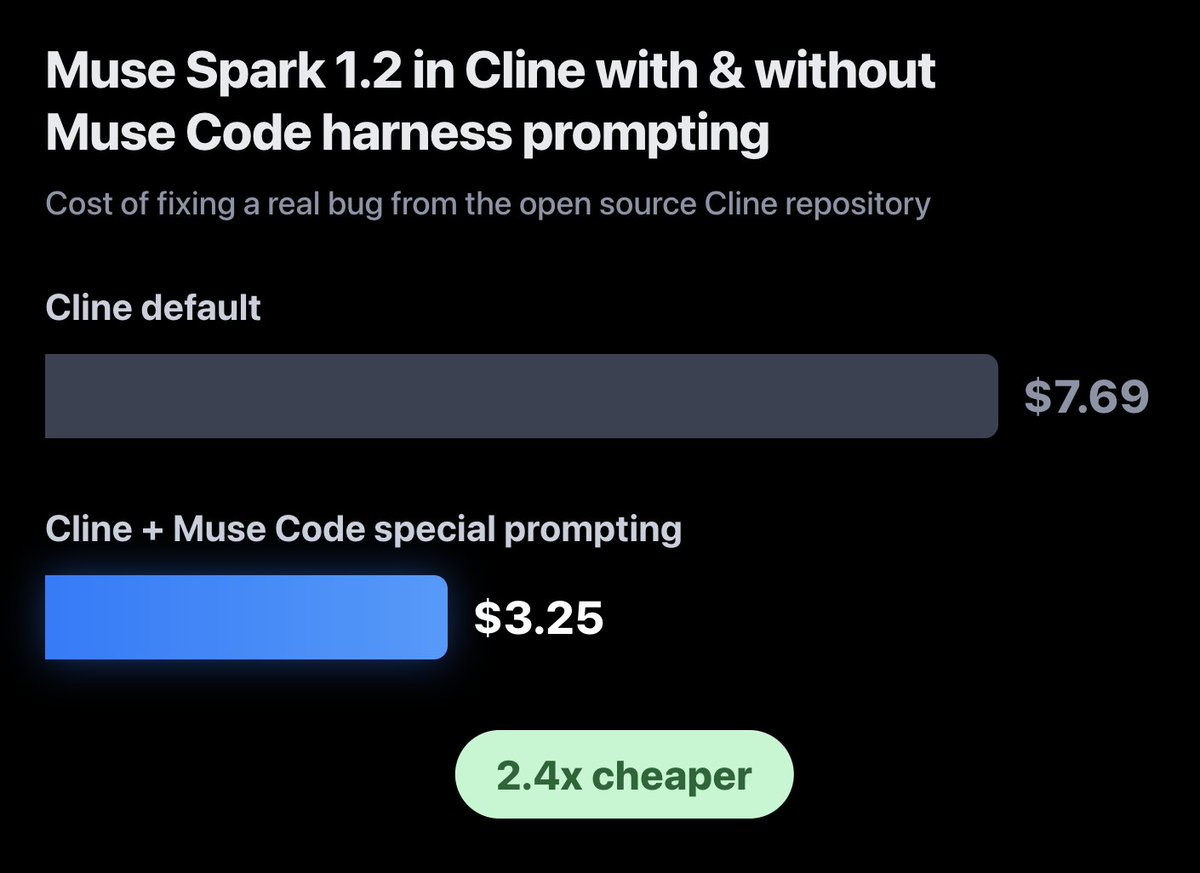
So we did a fun experiment: Meta claims Muse Spark 1.2 was co-trained with their Muse agent harness. So we extracted instructions from their system prompt and added
Files from a working DeepSeek Harness session against Muse Glimmer 30B served by Ollama on a DGX Spark, including a sample agentic security project that queries an AST call graph.
Dowser is a read-only MCP connector for Muse that surfaces open class-action settlements, product recalls with refunds, unused card credits, expiring points and birthday freebies, each with an official link.
A serverless, read-only Muse connector hosted on GitHub Pages: an OpenAPI document plus JSON conversation playbooks for declining, apologising, negotiating, following up and other hard messages.
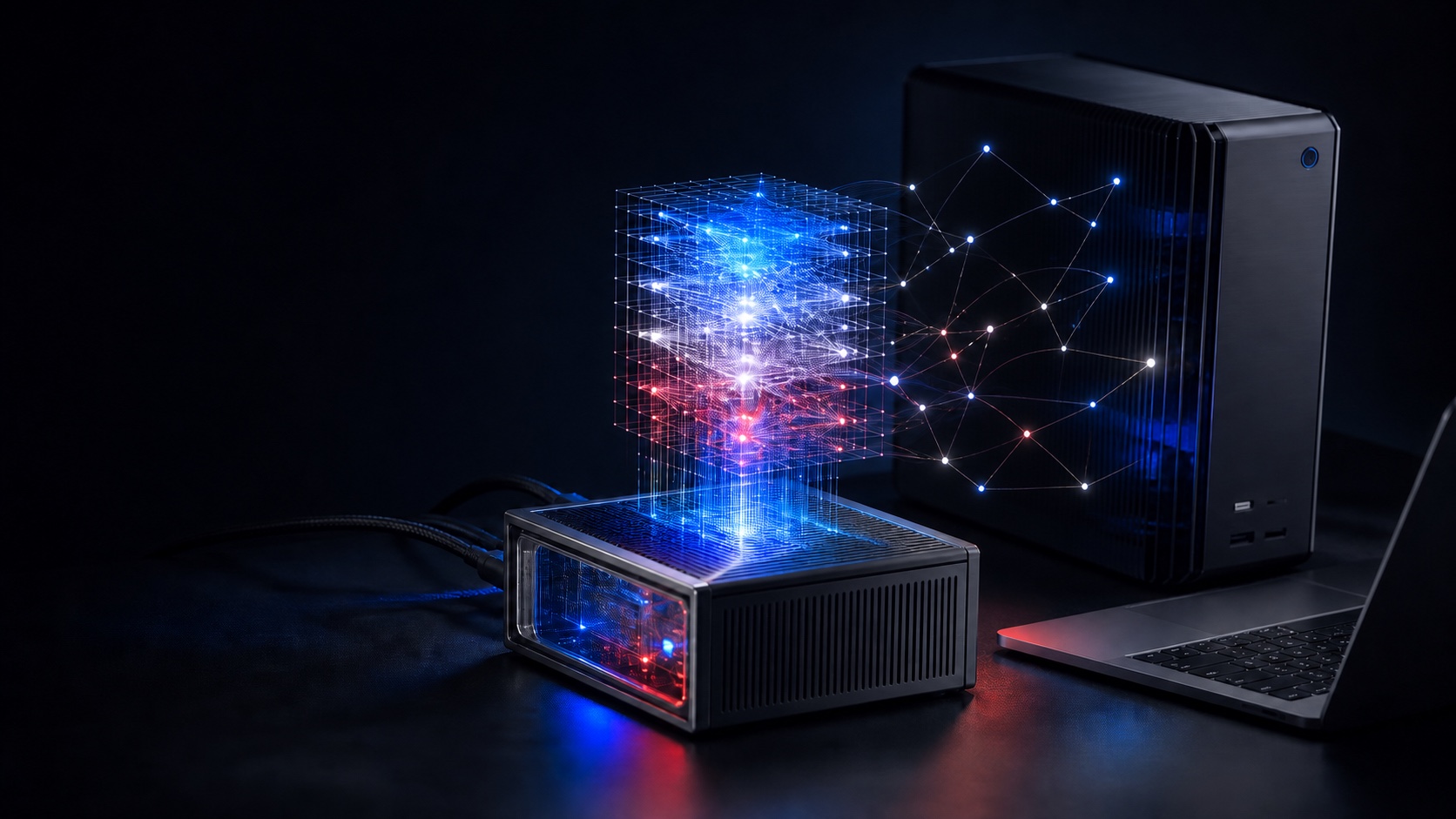
For a local agent to be practical, generation latency must be low enough to maintain workflow continuity.
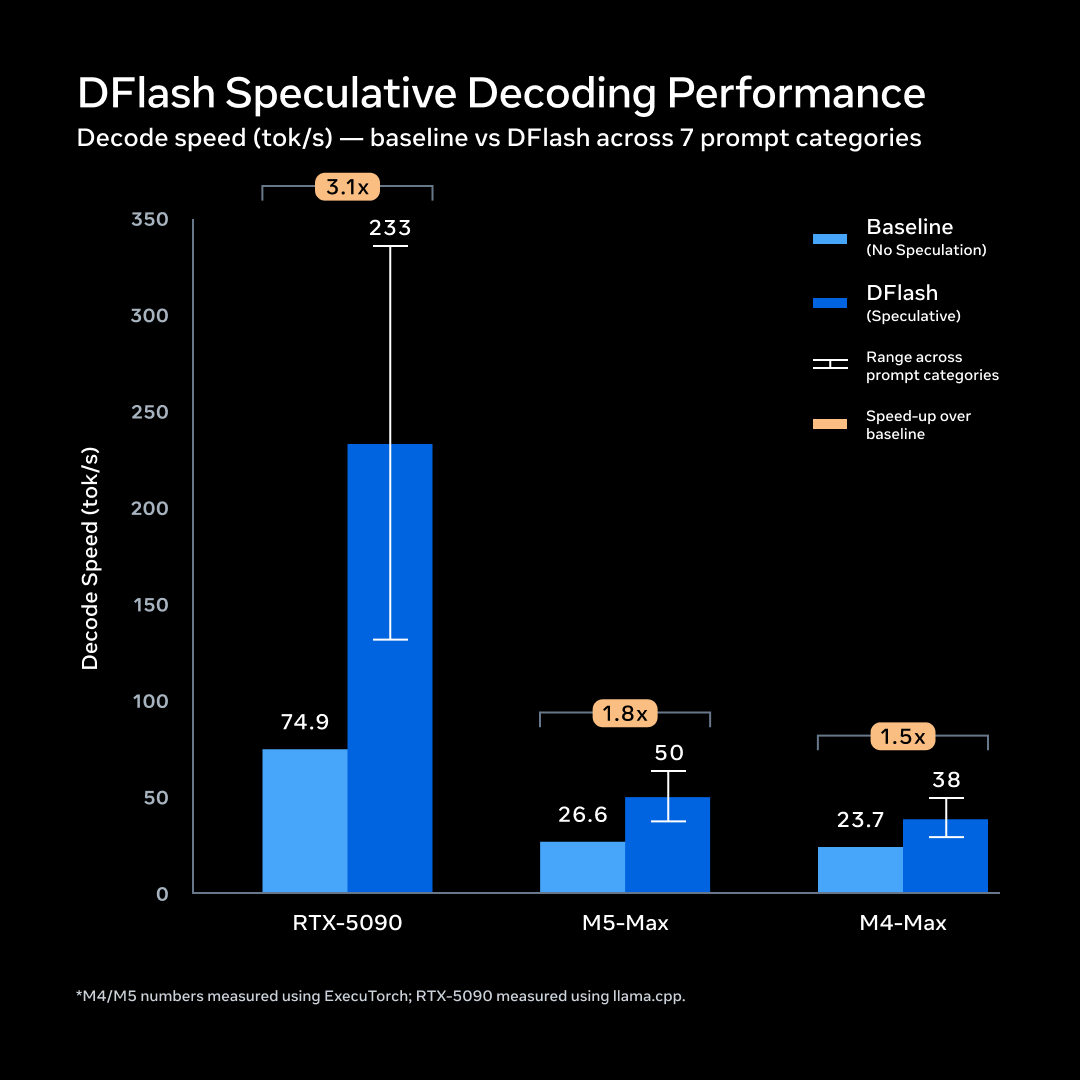
To run Muse Glimmer on consumer hardware without degrading quality, we used quantization to shrink the language model to under 20GB and a lightweight DFlash drafter model to
Muse Code OpenRouter is a small local adapter that lets the Muse Code harness run any meta/muse* model through an OpenRouter key instead of a Meta login.
A localhost compatibility gateway that lets the native Muse Code harness run on OpenRouter's muse-spark-1.2-contributor, rewriting only the model name and never falling back silently to another model.
NetworkCoder runs Muse Glimmer 30B on an RTX 3090, measures speed and VRAM, and gives two agent harnesses the same model, endpoint, project and prompt to compare results.
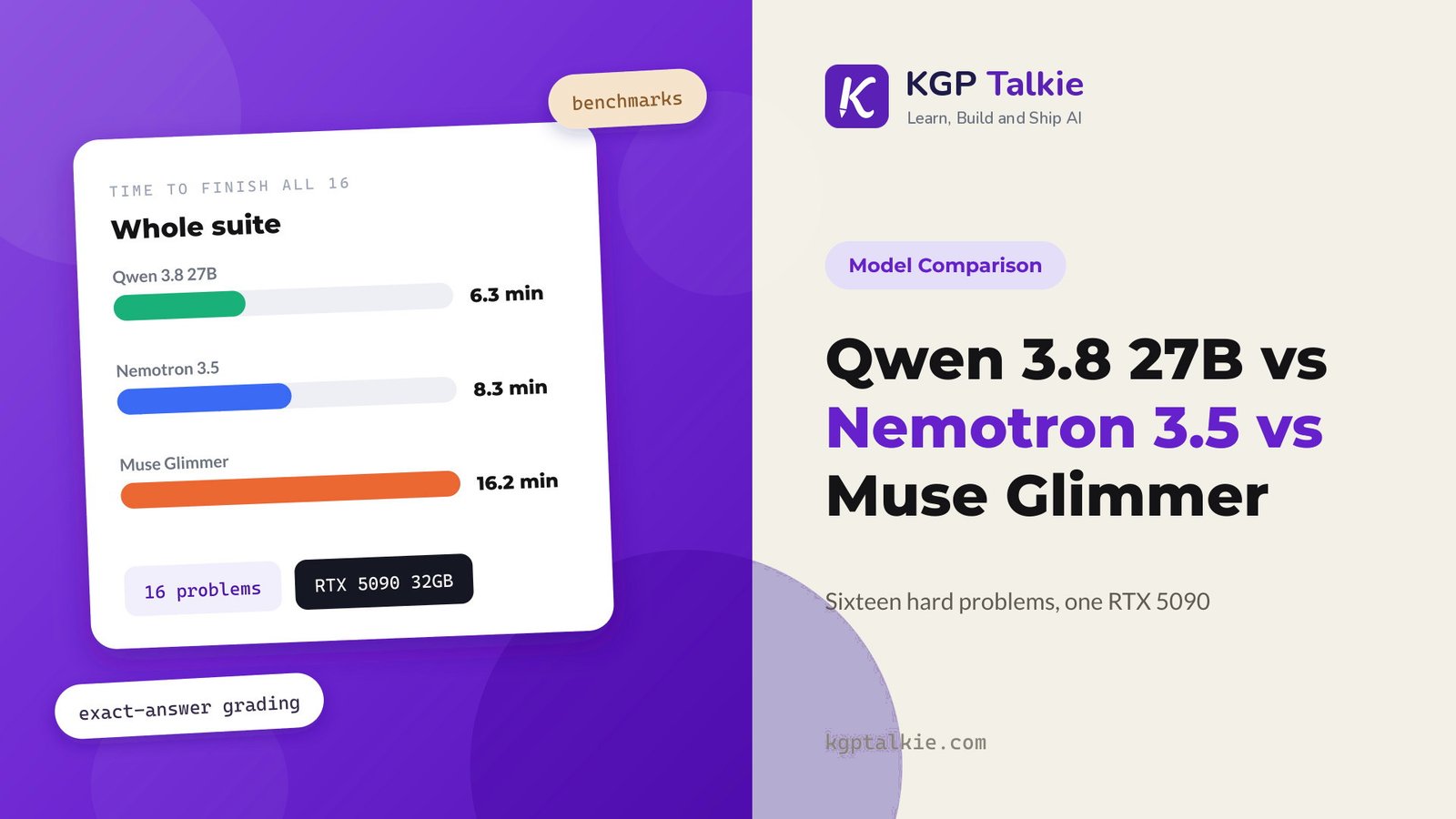
I noticed on the same hardware that I can get 24 x 128k contexts with muse glimmer (30b q8_0 + mmproj+dflash) only gets me 3x 256k or 6x 128k with qwen. But a straight forward analysis of the architecture suggests to me that qwen's state per token is somewhat smaller than glimmers.
So it seems llama.cpp is particularly memory inefficient for the qwen arch. I presume there is an existing issue for this, but I couldn't find one.
What's the deal?
The extra concurrency makes a big difference in batched performance.
Today @muse:
-booked and paid for airport parking, after recommending the best location for charging a @Tesla
-advised on flights for an upcoming trip during my kids’ fall break timeframe (which it found)
-read a receipt from @AceHardware and found that the prices were better
Built an open-source version of the Muse agent app which can be used with any model provider, run privately with local models.
Please give it a try and reach out for any feedback ✌️
https://github.com/CelestoAI/celesto/tree/main/open-muse
Wrappers that run the Muse Code harness against OpenCode Go and Zen Responses endpoints for muse-spark-1.3-contributor without changing normal Muse config or needing a proxy.
Meta Developers session on the Muse Spark and Muse Code build paths: the model provides see/decide/act, the harness provides reliability, scale and auditability for production code.
A hybrid harness with a claude-muse launcher that runs Claude Code on Meta Model API Muse Spark models, plus a /talk broker for structured exchanges between Claude Code and Muse Code terminals.
A video companion repo with the commands and configs for running Muse Glimmer 30B locally on an RTX 3090 and comparing the Prime Agent and Hermes harnesses under the same conditions.
musecode adds a /musecode slash command, a Haiku relay agent and a muse-run CLI so Claude Code Workflow fan-outs run their leaf tasks on the free Muse Spark 1.3 model through opencode.
freeCodeCamp's write-up of its three-hour Muse course by Andrew Brown, covering model benchmarks, API integrations, agent frameworks, the Muse Code harness, and a Go/SQLite/Docker full-stack build.
A terminal skill for trading any XRP Ledger token pair and minting NFTs, with a hard boundary between proposing and signing; testnet by default, and mainnet needs the Muse vault signer or a protected signer with per-transaction approval.
Disclaimer. This is the first time I've used Muse or VSCode as a harness. The reason I am using VSCode as a harness is this is a research project for my job, and we only have VSCode, Codex, and Claude Code approved for harnesses.
I ran it in a folder with only one HTML file (800 lines) that is a Roblox-style COD game. I just gave it a prompt "Can you fix the bugs in the file". It read the file 3 times, found one bug, started to fix it, then got stuck reading the same 10 lines over and over.
I imagine it's one of these three issues.
• It's a prompt error, being way too vague/open ended for the capabilities of a smaller model. I tried again, with a specific prompt to fix a specific bug, and it still just ends up so confused, trying to grep/find the file despite already having read it, and trying to find the code inside of the file.
• It's a limitation of small models running with a large harness/having way too much going on. I tried running it with Pi with its default prompt, and it just got stuck doing tool calls and never actually read the file. Tried running this just directly in the Unsloth Desktop UI with no harness but it failed to parse the file I inputted and tried to gen
Quick update on the RTX 5060 Ti local LLM repo. It has changed quite a bit since my previous posts.
The project started as a collection of practical notes and benchmark results. That was useful, but as the dataset grew it became harder to answer the question most people actually had:
What configuration should I run?
I have rebuilt the repo around tested, copyable presets rather than treating every successful benchmark request as a front-page result.
What changed?
The project now separates three things:
• Presets: exact configurations intended for people to copy and run.
• Evidence bundles: reviewed proof of context fit, retrieval, sustained generation and performance.
• Raw receipts: retries, failed experiments and diagnostic runs that are kept separate as engineering material without automatically becoming recommendations.
The website now leads with the published preset catalogue. The larger results explorer is still there for comparisons and historical data, but it is no longer the first thing visitors have to decipher.
There are currently seven published presets across the 1× and 2× RTX 5060 Ti lanes:
1× RTX 5060 Ti 16GB
• Qwen3.8 27B IQ3_XXS at 64K with q8 K
Meta's developer blog introducing Muse Spark 1.2, co-trained with the new Muse Code terminal harness, with 1M-token context for multi-file refactors and hours-long tasks.
Helicon is an open-source desktop and web app that wraps Meta's Muse Code CLI in a Codex/Claude-style interface, grouping sessions by project with history, resume and diffs on Windows, macOS and WSL2.
found another great use case for @Muse - list half a dozen things on fb marketplace in minutes. literally just take a picture, name your price and condition of the item and let Muse do its thing. i always procrastinated doing this because it was too tedious of a process but not
Named profiles for the Muse Code CLI: keep several logins on one machine, run two at once and let each project pick its profile. Published on npm and tested against Muse Code 1.3.0.
A reproducible Apple Silicon harness that runs six fixed quality tasks against MLX quantizations of Muse Glimmer 30B and records scores, tokens per second, peak memory and load time.
Muse connector application for public hardware-market research over Amoeba Farm's existing HTTPS API, exposing RAM and NAND market catalogs and options books as Raw API operations.
STARTUP HAKK tests Muse Spark 1.3 and argues the harness, tools and context around a model matter as much as the model, pitching their OpenMonoAgent harness.
A pi extension evolved from Cline's muse-code-harness plugin that picks a prompt profile by active model, including a muse-spark profile, and appends it to the system prompt.
An oh-my-claudecode-style gated pipeline for the Muse Code CLI, from deep-interview to verified code, shipped as a native Muse plugin manifest with a skills fallback.
Venelin Valkov pairs Muse Glimmer with Hermes Agent on llama.cpp for a fully free local agent, testing whether a better harness fixes the model's mixed early reviews.
muse spark 1.1 in AdaL Engineer beats Opus4.8 in Claude Code with 20% of the cost
loop engineering, when done right, is beyond just running longer, its delivering better results when contexts are managed well and when workers are better prompted to stay honest.
how GANs had
Muse Code plugin that polls OpenTable for hard-to-get reservations on a schedule, notifies on a match and can auto-book at most one table if the user opts in.
A reproducible RDNA reference that adapts MI-series ROCm recipes to run Muse-Glimmer-30B on Ryzen AI (Radeon 8060S) hardware, measuring 2.2–2.5x single-stream speedups from DFlash.
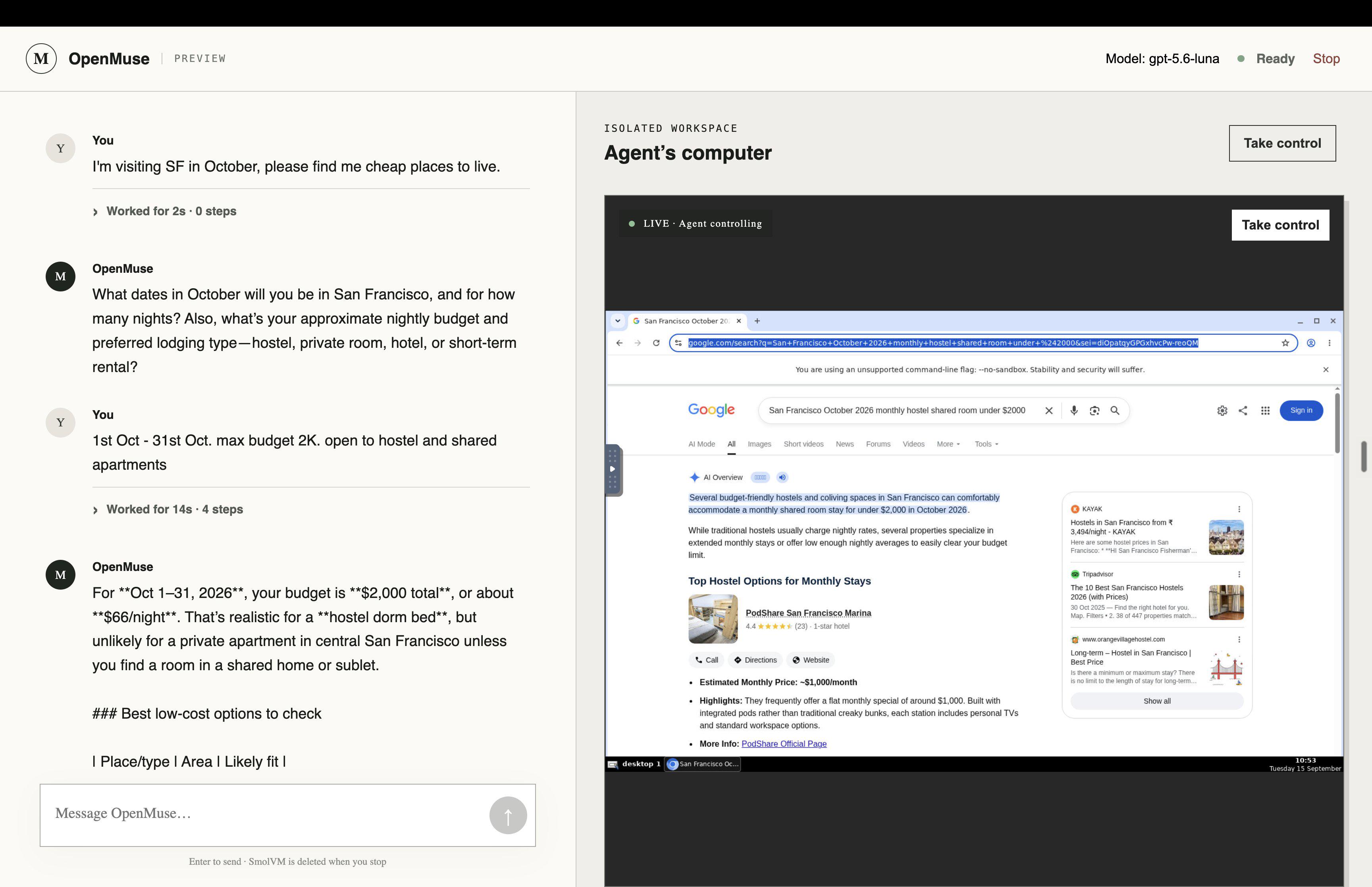
🎉 Introducing 𝙾𝚙𝚎𝚗𝙼𝚞𝚜𝚎
An open source, self-hostable personal assistant that works with any agent harness.
Includes:
- Computer use: browser, terminal & files
- Connectors for your personal apps
- Ideas, goals & progress tracking
- Built for Mobile and Web
Repo → https://
Rohan Adwankar found Muse runs on Cloud Hypervisor microVMs with a 327 MB Rust harness that boots in ~40 s, an on-VM Postgres with 194 tables and 60+ privsep tool workers.
Tested Muse Spark 1.3 on a ~10k LOC codebase and found it sometimes beat Gemini 3.8 Flash on hard multi-part backend bugs, though Gemini produced better-looking frontends.
A VS Code and Cursor sidebar chat that drives Meta's Muse Code CLI through muse exec --json, keeping Muse as the agent harness; its build is described in the post 'Inception: A Muse Inside Muse'.
Copyable block of the engineering conventions Muse Spark was co-trained with. Per the README, in Cline's harness it cut a real bug fix from 19.7M tokens, 49 min and $7.69 to 7.2M tokens, 24 min and $3.25.
You.com's harness for evaluating Muse Glimmer 30B on DeepSearchQA with You.com MCP tools inside pi sessions. A custom RLM v5 extension reached F1 0.8054 on 50 tasks (0.6910 over 900x3) versus 0.50 for plain skill injection.
Wavect's guide covers Glimmer's hardware targets (24–32GB) and tool-use scores such as MCP-Atlas 75.5 and SWE-Bench Pro 51.2, and recommends a 20–30 task pilot before production.
I've been migrating my workflow from ChatGPT Work / Codex over to Meta's Muse, and I've been auditing the harness as I go — reading cron files, checking diffs, mapping what the system actually does versus what it claims to do. It's a documentation gap.
What the docs describe
Meta's documentation is written for a normal user. It talks about the Ideas tab, the Goals tab, the Feed, and "background jobs that help Muse improve over time." Everything is described in terms of what it does for you. There is no architectural documentation. Nothing about how any of it is built.
What is actually on disk
Meanwhile, the home directory contains a fully legible agent architecture, just sitting there(these are just SOME examples, the system file structure is HUGE):
• ~/dreams/alignment/ — a nightly job that regenerates an alignment synthesis: a written portrait of the user, how to handle them, current frictions, relationship guidance.
• ~/workspace/objectives/goals/STUDYING.md — a daily learning-state projection with mastery bands, next-review dates, and retrieval prompts, plus a file of inferred goal leads the system guessed from behavior (with confidence levels and what would confirm or re
Meta's launch post for Muse Glimmer, an Apache 2.0 30B model for local agents that fits in ~20GB at 4-bit and runs on M4/M5 Max Macs, RTX 5090s or 24–32GB GPUs.

























 ChatForm
 Tgmlabs